THE PRODUCT / BY ZERIONIA / OCTOBER 26, 2026
A stutter lasts a second.
Its context deserves to stay.
When a game slows down, you often look for the right reading too late. Aegis connects what you felt to what your PC was doing at that exact moment.
Record a session, mark a moment, then review the report. Measurements stay local and unavailable readings remain clearly identified. A spike in load or temperature gives you something to investigate; it does not establish the cause of a slowdown on its own.
Aegis is built for players and everyday users who want to understand their machine without spending their time organizing captures. Published features are free. The app observes, records and compares, leaving hardware settings completely unchanged.
A bar that lets you play.
The horizontal HUD stays on top, lets clicks through and does not steal keyboard focus. Choose its position, size and opacity. In games like LoL, use Borderless or Windowed mode.
The game starts. Recording follows.
Recognised games can start a session automatically. For LoL, Aegis detects the actual match process rather than the client alone. Recording stops after the game closes.
Sensors grouped, not piled up.
CPU, GPU, RAM, network, storage and system readings have their own groups. Filter by component and choose whether to include unavailable readings. Available measurements come first.
Prerequisites, explained.
The installer includes the .NET runtime, PresentMon and the officially signed PawnIO driver. Setup explains the permissions needed for full CPU sensors. You can choose basic mode anytime.
BEFORE / AFTER
A useful comparison starts
with comparable sessions.
Record a game or a repeatable scene. Change one setting, then try again in similar conditions. Find sessions by name or date, open the latest report and select two captures to compare side by side.
Press Ctrl+Alt+F8 in game to mark a stutter as you feel it. CPU, RAM and temperature alerts use your own thresholds. CSV exports and self-contained HTML reports let you keep the results or share them yourself.
The bar does not show live FPS. An optional PresentMon capture can produce presentation statistics after it stops, depending on the game and ETW permissions. Aegis never substitutes a made-up number for a missing measurement and does not promise a boost in FPS.
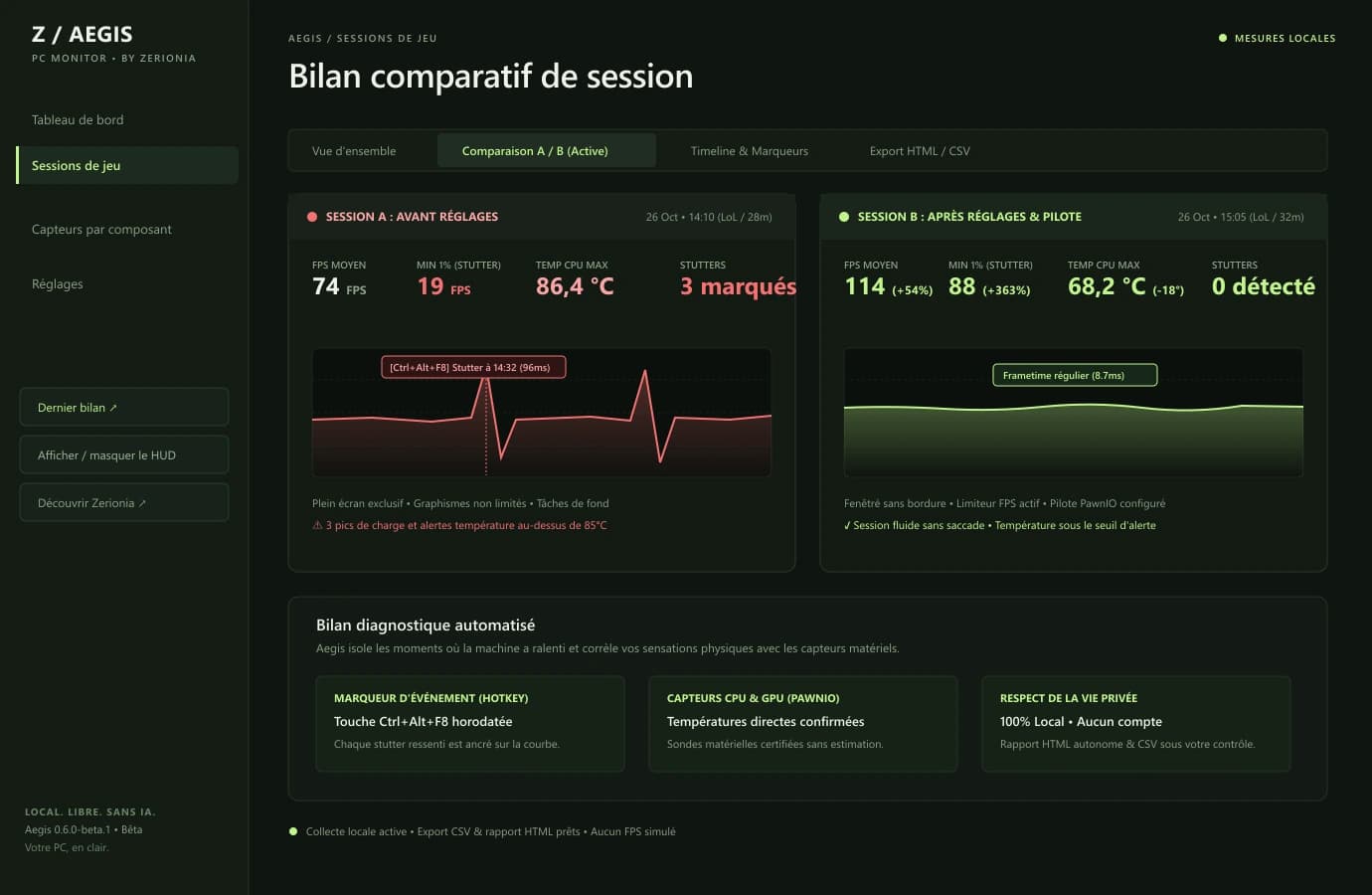
Ctrl+Alt+F8 in-game hotkey during high CPU thermal spikes. Session B demonstrates stable 68.2°C thermals and 0 stutters after borderless mode and frame cap adjustments.FIRST INSTALLATION
One file.
A guided setup.
Everything needed is in the package. Windows permission prompts remain under your control.
- Download the Windows installer.
Use the download button on this page. The file is named
Aegis-0.6.0-beta.1-Setup.exe(80.6 MB). It includes the .NET runtime, PresentMon and the CPU prerequisite: no separate downloads to hunt for. - Keep full CPU sensors enabled for temperatures.
Setup offers PawnIO, the officially signed driver. An existing compatible installation is reused. Accept the Windows administrator prompt if you want these readings, or choose basic mode.
- Launch Aegis and authorise the collector.
Windows requests the permissions required for full CPU readings. The interface runs as a regular user. Wait for the first measurements, then open your game. If Windows requests a restart after driver installation, restart before trying again.
- Choose your language, set the HUD and play.
Open Settings → Appearance to choose English or Français (in French: Réglages → Apparence). Use the in-game display settings to position the bar and Games to manage automatic sessions. For LoL, choose Borderless or Windowed mode.
A silent update does not silently add a driver. Outside a recording session, open the CPU sensor settings and choose the prerequisite installation option to finish setup.
DATA AND TRUST
Your measurements stay with you.
Sessions, markers and settings are stored locally on your PC. Aegis requires no account and has no built-in upload of measurements to a remote server. Support reports are prepared locally and can be reviewed before you share them.
Update checks contact GitHub; downloads happen outside recording sessions and installation requires confirmation. These options can be disabled. Source code, third-party notices and beta limitations are public.
The current version passed 83 checks, including real collector readings. CPU temperature was verified on the development PC after configuring the driver and permissions. This does not guarantee every hardware configuration, game or anti-cheat system.
BEFORE YOU START
Useful answers.
Is Aegis free?
Yes. Published features are free, with no account or subscription. The original code is MIT licensed; third-party components retain their own licences.
Can I use the app in English or French?
Yes. Both language packs are included in the installer. Choose English or Français in Settings → Appearance (Réglages → Apparence in French). The choice is saved locally on your PC.
Why does Windows ask for permission?
Full CPU temperature readings use the PawnIO system driver. Its officially signed installer is included. Windows asks for permission to install it and run the hardware collector with the required rights. The interface runs as a regular user.
What if I decline permission?
Aegis keeps a basic mode with accessible readings and explains why a temperature is missing. You can return to CPU sensor setup outside a recording session.
Does the HUD work in League of Legends?
Use Borderless or Windowed mode. The external HUD lets clicks through and does not take keyboard focus. Exclusive fullscreen may hide it. No Riot certification or universal anti-cheat compatibility is claimed.
Does the bar show live FPS?
The bar shows CPU/GPU/RAM load and available temperatures. Presentation statistics are calculated after an optional PresentMon capture, depending on the game and ETW permissions. The HUD does not display live FPS.
Where are my sessions stored?
On your PC, in %LOCALAPPDATA%/AegisNext. Aegis does not upload measurements to a server. You control sharing of exports and support reports. Update checks contact GitHub and can be disabled.
Why might Windows show a warning?
Aegis is a beta and is not yet Authenticode signed. The PawnIO prerequisite retains its official signature. Check the source and checksum of your download; keep Windows protections enabled.
How do I uninstall Aegis?
Close Aegis and use Windows installed apps. Your sessions are retained. PawnIO is a shared driver: it remains installed and can be removed separately if no other tool uses it.